Free SQL Server Security Check: Get-SqlSafe
Get-SqlSafe Community Edition is a free PowerShell script that runs 27 core security checks against your SQL Server and writes a local HTML report. It only reads, and it shows where to look first: privileged access, authentication, auditing and risky settings.
Download Get-SqlSafe from GitHub
What the free security check looks at
In total: 27 core checks plus 4 informational items. The report shows each result with an explanation, filters by outcome and a summary chart.
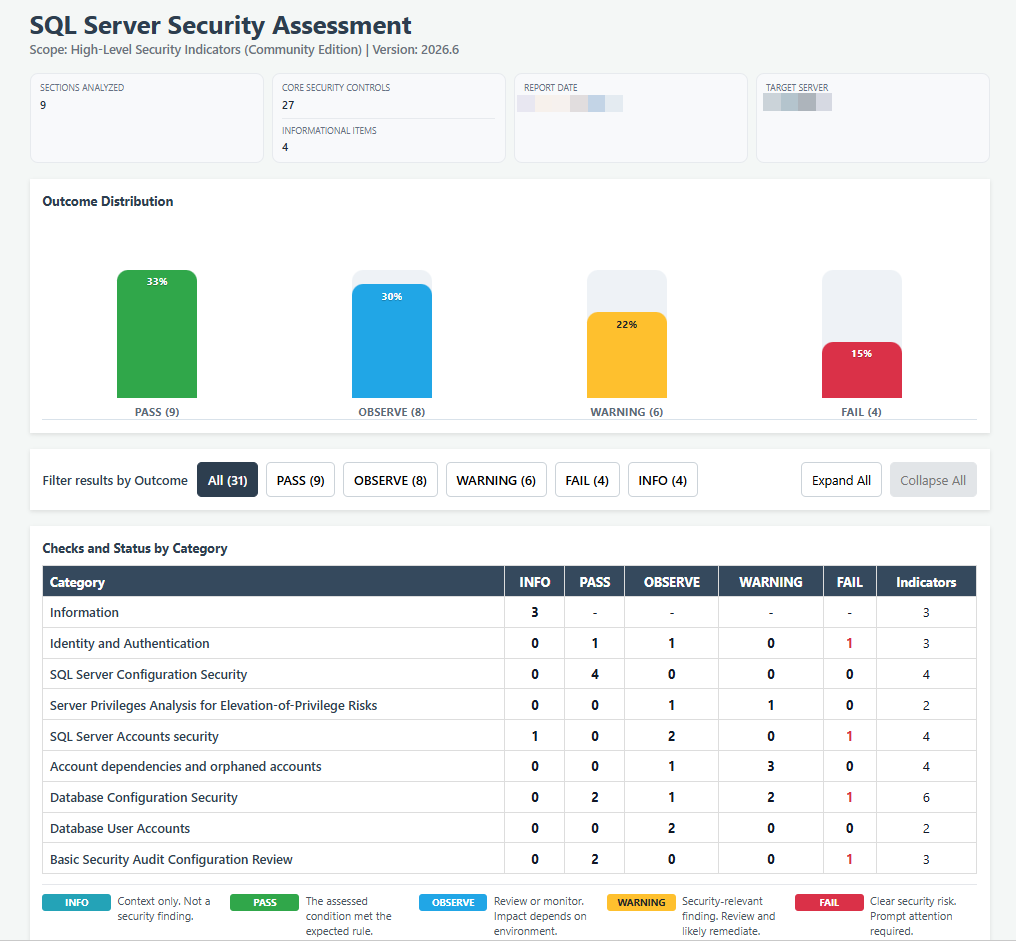
Where it runs
- SQL Server 2016 to 2025, on-premises or in a virtual machine. Older versions may need broader permissions for some checks.
- Amazon RDS for SQL Server, through a compatibility mode.
- Azure SQL Database, through an optional module and Microsoft’s own PowerShell modules.
It needs Windows PowerShell 5.1. For SQL Server and Amazon RDS, the script is all you need: no modules to install.
How to run it
- Download Get-SqlSafe.zip from GitHub and extract it.
- Test it on a non-production instance first, as with any new tool.
- Run
.\Get-SqlSafe.ps1, choose the target and sign in. A connection dialog guides you; console mode is available for scripting. - Review the report. It opens in your browser and stays on your machine.
The script is built for least privilege: it doesn’t need sysadmin on current SQL Server versions, and you can limit its permissions further. The README lists the exact permissions per target and every check.
What the full Security Assessment adds
The Community Edition is a first look, not an audit. Our SQL Server Security Assessment goes much further:
- About 90 to more than 140 checks, depending on the tier, including patch level, and we call out where misconfigurations and permissions combine into an exploitable path.
- Reviewed by our team, not just generated: findings are explained in the context of your environment.
- Prioritized fixes your team can act on, and a walkthrough of the results.
Want to see what you get? We send a sample assessment report on request.
Read the introduction to Get-SqlSafe Community Edition by Andreas Wolter.
Frequently asked questions
Is Get-SqlSafe really free?
Yes. The Community Edition is free to download and use. The license is in the GitHub repository.
Does it change anything on my SQL Server?
No. It only reads metadata and doesn’t change configuration or data. As with any new tool, test it on a non-production instance first.
What permissions does it need?
It doesn’t need sysadmin on current SQL Server versions, and you can limit its permissions further. See the required permissions in the README for each target and version.
Where does the report go?
The report stays on your machine: an easy-to-read HTML page with charts and filters, so you see at a glance where to look first.
Is this a security audit?
No. It points to indicators of risk in selected areas. It is not a full audit, a penetration test or a compliance assessment. For that, see the Security Assessment or the Security Audit.
Can you help me interpret the results?
Yes. Send us your questions, or book a short call. If the report shows more than you expected, the Security Assessment is the next step.
Found something in your report?
Tell us what the script showed. We’ll tell you what it means and what to fix first.